
User's Guide: GearGrip - Pro
Attaching the GearGrip Pro harness to your computer:
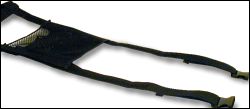 |
Unbuckle
the GearGrip-Pro harness and lay it out on a flat surface
with the inside of the harness facing up. Note: If you wish
to adjust the position of the GearBag, it is easiest to
do at this point while the GearGrip is not on the computer.
|
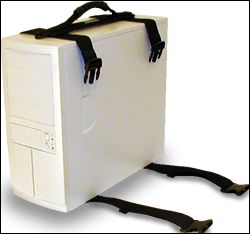 |
Place
the computer in the middle of the long straps and bring the
handle end over the computer. |
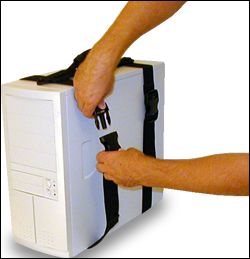 |
Connect both
buckles as shown. Make sure the straps are not twisted.
Tighten the straps by pulling down on the free end while
keeping the handle in the center of the top of the case.
Cinch the straps
tightly! Only the tension on the straps prevents the computer
from sliding from front to back.
GENTLY
LIFT THE COMPUTER TO MAKE SURE THE HARNESS IS PROPERLY ATTACHED.
RETIGHTEN STRAPS AFTER THE FIRST FEW LIFTS.
The harness will stretch and conform slightly after attached.
BACKUP
CRITICAL DATA PRIOR TO TRANSPORT!
Computers are sensitive equipment, so handle with care.
|
Adding
and Removing CableGrips:
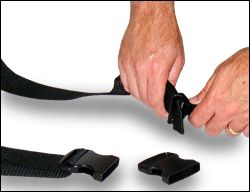 |
If it is necessary
to remove a CableGrip, remove the GearBag and slide the
CableGrip to the female buckle end of the strap.
Remove the female
buckle and feed the CableGrip past the folded end of the
strap. This is a tight fit, but with patience it can be
done.
To add a CableGrip
the process is simply done in reverse.
|
Q&A
"I
am placing my GearGrip - Pro on a smaller case and the tails on
the straps are too long. Can I cut them shorter?"
Yes, you
can shorten the length of the straps if needed. Leave at least
6 to 8 inches of strap so you have something to grip while tightening.
To prevent the strap from fraying, use heat to melt the end slightly.
Note that if you cut off the strap end you will lose the added
safety provided by the folded end and it will be very important
that you keep the straps tight while transporting. Modification
will also void the product warranty.
Often
times we recommend that you simply use a rubber band to keep extra
material out of the way. This allows for the unit to be used on
larger cases in the future.
"Will
the GearGrip fit on my type of PC or LCD screen?"
GearGrip products are offered in a number of sizes to allow for the best fit on each piece of equipment. Please make sure you look at the "details" page for each product, found by clicking on the product image, in order to see the size ranges appropriate for your equipment. If you can't tell with this information, please contact us and we will be happy to assist you further on identifying the correct size.
Payment
CaseAce
Products accepts MasterCard, Visa and American Express credit
cards. We do not ship
C.O.D. If you prefer, we offer an order-by-mail process as an
option during our online checkout. Simply fill your shopping cart as you would
for a credit card purchase but when asked about processing type
choose "Print and Mail" instead of "Electronic
Processing". Enclose a check with the printed form and mail
to:
CaseAce
Products
PO Box 3622
Escondido, CA 92033-3622
Product
will be shipped after your check clears.
Warranties,
Refunds and Returns
CaseAce
Products offers a 30-day money back guarantee. If you are not
completely satisfied with the product, we will refund the original cost of the product (less original shipping and any return shipping costs). Contact us for a return authorization
number. Product must be unmodified and in "like-new"
condition to qualify for a refund.
CaseAce
Products also offers a one-year warranty against defects in manufacturing.
The warranty applies to the original purchaser only and to products
that have not been modified or abused. We reserve the right to
repair or replace the defective product at our discretion. Contact
us if you have a warranty issue and we will determine how best to resolve the issue.
Shipping
Policy
We are able to offer shipping to the USA only. Shipping will be via UPS Ground (contiguous US) or US Postal Service (Alaska, Hawaii, US Territories). International customers, please visit our resellers for possible shipping options.
Privacy
Policy
CaseAce
Products takes the privacy of your personal information seriously.
Our practices are described as follows.






